This example demonstrates using IntervalMatch to count the number of days in a transaction. The transaction days could be calculated in the script by computing EndDate-StartDate, but using IntervalMatch allows for flexible counting of subtotals across various date dimensions such as Month or Quarter. The example data is for a rental company that rents out equipment. The input data is: Assigning dates to temporal groups such as “Yesterday”. This example demonstrates assigning dates to named range groups, such as “Today” or “This Month”. Note that a Date may belong to more than one group. For example, today’s date belongs to “Today”, “This Week”, “This Month”, “Last Two Months” etc. V2 update adds group named “Next Workday”. This example provides a template script for building a delta (incremental) load script. A delta load fetches only new or changed rows from the database. This template can handle all three common database update scenarios — Insert, Update and Delete. This example demonstrates using the Previous() function and WHILE clause to “fill in” values in a date range. In this exercise, a transaction file provides Products, Prices, and the date the Price is effective. The goal is to determine the Product Price for any given date. This example lists information about disk files using the FileList() and DirList() script functions in conjunction with the FOR EACH statement. A pattern and subroutine is defined to process multiple directories. Load and Merge data from an input file that contains multiple record types. The test file has a phone number id record followed by some call detail records for that phone number and a total charges row. We want to associate the phone number with the detail rows. LOAD Users and Groups from Active Directory using AdsDSO. This version uses no Macros. See the script source for details and setup for your AD domain. This receipe demonstrates how to read numbers that have non-standard number signing formats, for example a trailing “-” to indicate negative numbers or a keyword like “DEBIT”. 102- Both should be interpreted as negative numbers. -102
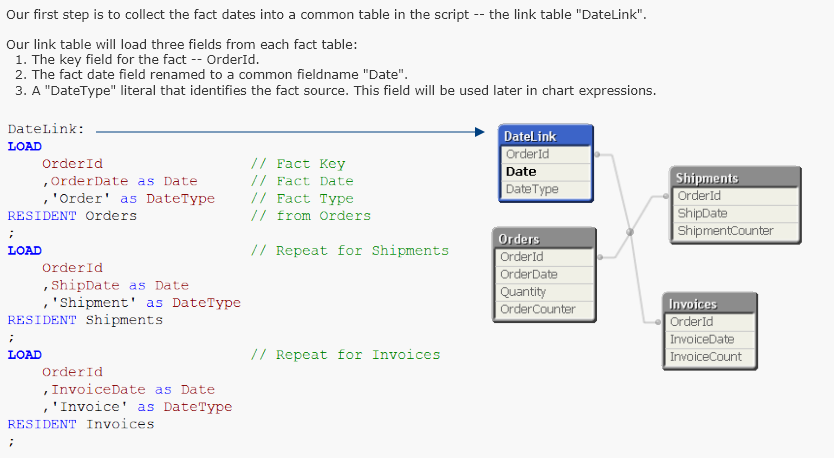
This example provides a script pattern for loading fields from multiple files, when the field names vary between files. The same field name may use a different spelling between files. There may also be extra fields in some files that should not be in the final data table. Mapping values using a table with wildcards. Sometimes you want to use QV mapping to group values. The QV MAPPING LOAD / MAP USING / APPLYMAP is excellent for this. However, sometimes you have many different values to map and a comprehensive map is not available. This sample presents a technique where wildcard characters may be used in the mapping table to simplify the map definition. This is a generalized script to created a QVD file from Windows Performance Monitor csv file(s). The script will discover and create a QVD field for every Perfmon Counter found in the csv files. Dimension Fields for DateTime, Group and Instance will be created as well. Qlikview script contains many powerful and useful string functions. But sometimes you want the power of Regular Expression (RegExp) pattern matching. QV does not yet provide a native Regular Expression function. This sample uses a very simple macro that uses VBScript to provide a RegExp pattern matching function in QV script. Extracting content from HTML using a module script function. The function “ExtractInnerHtml” used in the script is written in the document module using the VBScript Regular Expression object. To view or modify the function definition, open the Module Editor (Ctrl-m). This example demonstrates assigning times to named range groups, such as “Midnight Shift” or “Early Evening”. This facilitates making selections by meaningful names, for example selecting events that occurred during a manufacturing shift. Note that a Time may belong to more than one group and intervals may overlap. Some systems produce display numbers using a trailing minus sign. Qlikview expects a leading minus sign to indicate negative numbers. This expression is one way to read numbers with trailing minus signs. It will work with both leading and trailing minus signs. This tutorial presents a script pattern for assigning time dimensions to multiple fact dates in a data model. The pattern will demonstrate how to link all fact dates to a common calendar as well as using separate calendars for each fact date.
Count Days In A Transaction Using Intervalmatch
 Count Days In A Transaction Using Intervalmatch - Qlik Sense
Version 1, Dec 5, 2013 Count Days In A Transaction Using Intervalmatch - QlikView
Version 1, Dec 5, 2013
EquipmentId, DateOut, DateInDate Grouping
Date Grouping - Qlik Sense
Version 3, Dec 5, 2013 Date Grouping - QlikView
Version 2, Dec 5, 2013Delta Load Template
Delta Load Template
Version 1, Apr 20, 2015 - QlikViewExpand A Pricing Date Table
Expand A Pricing Date Table - Qlik Sense
Version 1, Dec 5, 2013 Expand A Pricing Date Table - QlikView
Version 1, Dec 5, 2013List Files
List Files - Qlik Sense
Version 1, Dec 5, 2013 List Files - QlikView
Version 1, Dec 5, 2013Load Input File Containing Multiple Record Types
Load Input File Containing Multiple Record Types - Qlik Sense
Version 1, Dec 5, 2013 Load Input File Containing Multiple Record Types - QlikView
Version 1, Dec 5, 2013Load Users and Groups from Active Directory
Load Users and Groups from Active Directory - Qlik Sense
Version 1, Dec 5, 2013 Load Users and Groups from Active Directory - QlikView
Version 1, Dec 5, 2013Loading Non Standard Numeric Signs
Loading Non Standard Numeric Signs - QlikView
Version 1, Dec 6, 2019 Loading Non Standard Numeric Signs - Qlik Sense
Version 1, Dec 6, 2019
400 DEBIT
-400Loading Varying Column Names
Loading Varying Column Names - Qlik Sense
Version 1, Dec 10, 2018 Loading Varying Column Names - QlikView
Version 1, Dec 10, 2018Mapping With Wildcards
Mapping With Wildcards - Qlik Sense
Version 2, Oct 30, 2018 Mapping With Wildcards - QlikView
Version 2, Oct 30, 2018Perfmon QVD
Perfmon QVD
Version 1, Feb 5, 2014 - QlikView
Regular Expression Pattern Matching
Regular Expression Pattern Matching
Version 1, Dec 5, 2013 - QlikViewStrip HTML From Text
Strip HTML From Text
Version 2, Oct 29, 2015 - QlikViewTime Grouping
Time Grouping - Qlik Sense
Version 1, Aug 13, 2023 Time Grouping - QlikView
Version 1, Aug 13, 2023Trailing Minus
Trailing Minus
Version 1, Dec 5, 2013 - QlikViewTutorial - Using Common Date Dimensions
Tutorial - Using Common Date Dimensions - Qlik Sense
Version 1, Dec 5, 2013 Tutorial - Using Common Date Dimensions - QlikView
Version 1, Dec 5, 2013