Analyzing Your QVPR

The Qlikview Management Console (QMC) is used to define Reload and Distribution tasks for your Qlikview documents. These definitions are stored in a set of XML files — the Qikview Repository (QVPR) — located in C:ProgramDataQlikTechManagementServiceQVPR on your server.

The QMC provides a good overview of scheduled tasks, but a better analysis is sometimes need to answer questions like:

  • What documents are being scheduled on a Monthly schedule? Weekly?
  • What documents are using Dynamic Distribution (reduction) and what field controls the distribution?
  • Which administrator modified this task and when?
  • What documents are being distributed to group Accounting?
  • How many documents are being distributed as PDF?
  • Do I have logical errors in my QVPR?
  • When was my server upgraded?

I’ve produced a “QVPR Analysis” tool that loads the QVPR XML files and makes them available for Qlikview analysis to answer the above questions and more. You can download the QVPR Analysis tool  from the “Tools” menu of QlikviewCookbook.com.

The download link above contains some screenshots from the tool (names are scrambled in the images).

You can load directly from the server QVPR folder or an offline local copy obtained from the server. The offline capability makes the tool especially useful for remote consultants who can analyze a customer’s configuration without having QMC access.

This is the same tool provided to Masters Summit for Qlikview attendees last year. If you’ve already received a copy, no need to download again. I plan to continue enhancing the tool and will release further updates on QlikviewCookbook.com.

The analysis is pretty much text and tables which has suited my needs just fine. I’ve used the tool several times to solve some tricky customer problems or get someone out of a jam.

If you have Qlikview Publisher, you’ll get detailed information on Distribution tasks. If you don’t have Publisher, you won’t have distribution information but you’ll still get useful information on reload schedules and QVPR structure.

If you build some new analysis or find the tool useful, drop me a comment.

-Rob

Share

A Color Trick

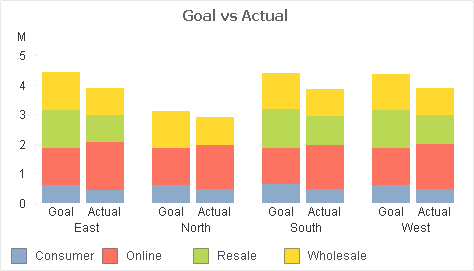
A Customer showed me this stacked bar chart and asked how to “make the Goals a different color”. What he really wanted was to differentiate the Goal stacks from the Actual stacks — but still be able to associate the Channels (Consumer, Online,…).

Channel values are expected to change over time, so any hard-coding of Channel to color would require maintainence. Here’s the Background Color expression I suggested:

if(Type=’Goal’
,argb(96,255,255,255) bitand color(FieldIndex(‘Channel’,Channel))
,color(FieldIndex(‘Channel’,Channel))

If that makes perfect sense to you, read no further. Otherwise let me break the expression down.

What we are doing in the expression is setting the Alpha value to “96” when “Type=Goal”. “Type=Actual” will retain the Alpha default of “255”.

Color codes in QV are made up of four numbers — Alpha, Red, Green, Blue — values which we can set in a color dialog or a color function. Alpha indicates the amount of transparency, ranging from 0 (fully transparent) to 255 (fully opaque). Colors functions without an explicit Alpha value like “RGB(0,128,0)” default to Alpha=255.

The function “Color(n)” returns the color code for the “Nth” position in the chart color palette.

FieldIndex(‘Field‘, Value) returns the position of  Value in Field (by load order).  This will generate a number for each distinct Channel value, regardless of how many Channel values are loaded. We are effectively assigning persistent colors because FieldIndex() is not affected by selections.

1. We use color(FieldIndex(‘Channel’,Channel)) to select color n from the palette.

2. If  Type=Goal  we use the boolean bitand operator to set the Alpha value for the selected color to “96” without modifying the RGB values. Adjust this 96 value for an effect of your liking.

-Rob

Share

Qlikview Cookbook Online

My “Qlikview Cookbook” is now available online at QlikviewCookbook.com where you can browse and download high-quality examples and tutorials.

In 2008 I published the first edition of the “Qlikview Cookbook”, a downloadable collection of Qlikview examples designed as a reference and training tool for Qlikview developers. The last update to the Cookbook was in 2011 and  it has been downloaded from RobWunderlich.com over 20,000 times.
You can follow updates to the Cookbook in a couple of ways:
1. Sign up for the Cookbook Newsletter on the Qlikview Cookbook home page. You’ll receive a monthly email of “What’s New” plus bonus material. 

2. Follow @QvCookbook on twitter.

Use the site’s contact form to leave me any suggestions or requested additions. 

Happy learning!

-Rob
Note: The QlikviewCookbok site is not related to the similarly named and excellent book “Qlikview Cookbook for Developers” by Stephen Redmond. 
 
Share

Masters Summit for Qlikview — Chicago April 1-3

Masters Summit for Qlikview

The next  Masters Summit for Qlikview is approaching. Dates are April 1-3 and the location this year is Chicago.

I’ll be joining some of the leading QlikCommunity contributors and authors live for 3 days  to discuss advanced techniques in building complex solutions with QlikView.
Sessions are targeted at intermediate to advanced Qlikview developers and will cover advanced tools and techniques across a wide spectrum of Qlikview development skills — Scripting, Modeling, Visualization, Expressions, Server, Performance. See the list of sessions here.
In 2013 Masters Summits were held in Las Vegas, London and Barcelona. Response from the attendees was overwhelmingly positive. Read their comments here.
For complete program details and registration information, see the Summit Website. I hope to see you there!
Share

Using Alerts to “Send the Numbers”

The Qlikview Document Alert feature is generally thought of as a way to notify users or administrators of exceptional conditions in the loaded data. But it may also be used for regular emailing of non-exception conditions, like daily sales figures. This can be very useful to inform mobile or travelling user of the status of Key Performance Indicators.

The Document Alert feature is part of basic Qlikview. No additional software or license is required. Please note that that Alerts can only send out text email. They cannot send graphical charts or attachments. If you want that  functionality, look to third party addons such as NPrinting.

Alerts are configured in a QVW using the menu item: Tools, Alerts. The Alert Message may contain dynamic (calculated) content in the form of an expression like:

=’Sales YTD:  ‘ & money(sum({<Year={$(=year(max(OrderDate)))}>}OrderAmount))

I won’t go deep into the configuration details here, because I’ve provided a downloadable annotated example at this link:
Qlikview Cookbook: Using Alerts To Send Numbers Via Email 

The example will produce an email after reload that looks like this:

Alerts are a low cost and simple way to expand the reach and value of your QV applications. Users receiving emails do not require a Qlikview license.

-Rob

Related posts on Alerts:
http://qlikviewnotes.blogspot.com/2010/09/monitoring-reload-schedule.html
http://qlikviewnotes.blogspot.com/2010/12/alert-questions-answers.html

Share