All posts by Rob Wunderlich

Preparing your script for QV12

Summary: I provide a tool to check your script for compatibility with QlikView version 12. 

I’ve blogged about a couple of script changes in QV12 here.  Since then I’ve also noticed that the $(include) statement is also affected by the Directory statement. That is, if the script below works in QV11, it will not work in QV12:

DIRECTORY Data;
 $(Must_Include=config.txt);

This is because QV11 looks for the file in the working directory where the QVW is, whereas QV12 will respect the DIRECTORY statement and look in the Data directory.

To summarize compatabilty considerations for QV12:

How will you know if you have existing  script that may be impacted by these changes in QV12?  In an earlier post, I introduced the Script Repository tool which can be used to search script across QVWs.

You can use the tool to  search for potential issues.  But I thought I would make it a bit easier by adding a dedicated “Version 12 Upgrade Check” sheet that does the searching and highlighting for you.

The chart at the top of the sheet will list any document that has script that should be examined further.  Select a document, press the highlight button and the script of interest will be outlined in yellow.

My guess is that most customers will not have any compatibility issues.  But why take chances?  Be a hero and scan your script before upgrading.

-Rob

Join me at an upcoming Masters Summit for Qlik event in Johannesburg (6-8 Sept) or Austin (10-12 Oct).  In my Advanced Scripting session, in addition to teaching important scripting techniques, we’ll look at methods and tools for managing your “script farm”. 

Share

Alt States Merged Selections Tip

Summary: I suggest a simpler syntax for merging selections from multiple states. 

You may be familiar with the “Product Grouping” example from the “What’s new in QlikView 11.qvw” sample.  It’s a great  beginner demo of using Alternate States for comparative analysis.

In this visualization, a user can select two sets of values from the [Product Sub Group] field. The two different sets are represented by two states, [Group 1] and [Group 2].  The blue [Group 1] bar is plotted on the bar chart using this expression:

sum({[Group 1]<Region = $::Region, [Sales Rep] = $::[Sales Rep], Path = $::Path, Year = $::Year, Quarter = $::Quarter, Month = $::Month>} Sales)

[Group 1]  as the Set Identifier indicates we want to start with the selections in [Group 1]. We then modify, or add, selections from the default state by referencing each field with the “$::fieldname” syntax.

The green [Group 2] bar is created with a similar expression, the only difference being [Group 2] as the Set Identifier.

The “$::fieldname” syntax works, but it forces us to list every field. Listing every field can get difficult. Is there an easier, more generic method?  Yes, if we redefine the problem as:  All selections from the Default state except for [Product Sub Group].

sum({[Group 1] * $<[Product Sub Group]=>} Sales)

Breaking the Set Expression down:

[Group 1]    // Group 1 selections
*    // Intersected with
$<[Product Sub Group]=>   // All selections from Default except [Product Sub Group]

I’m not suggesting  the sample is wrong. The “$::” syntax is useful to know and is required when you want to reference only specific fields.  I’m posting this alternative because I see people copying this more complex $::  syntax when the simpler syntax would suit their application.

-Rob

Join me at an upcoming Masters Summit for Qlik event in Johannesburg (6-8 Sept) or Austin (10-12 Oct).  Oleg Troyansky’s Set Analysis and Advanced Aggregation session provides  more useful tips and advanced techniques in using Alternate States.


Share

Touchless Formatting

Summary: I show a scripting technique to assign display formats to loaded data without touching existing load statements. 

I coded in  SAS for many years and always appreciated the FORMAT statement which allows  assigning a display format to a field, independent of loading the field.

FORMAT OrderDate MM/DD/YYYY;

In QlikView and Qlik Sense script, there is an  equivalent that is useful to be aware of.   It’s not a statement, but a little known trick (so little known I’ve never seen anyone but me do it, although I’m sure others have thought if it).

// Load some dummy fields just to assign formats
TempFormatTable:
LOAD
 Date(0, 'MM/DD/YYYY') as OrderDate,
 Date(0, 'MM/DD/YYYY') as ShipDate,
 Num(0, '00000') as PostalCode,
 Num(0, '#,##0.00') as OrderTotal
AutoGenerate 1;

Facts: // Load the QVD
LOAD * FROM data1.qvd (qvd);

DROP TABLE TempFormatTable;  // Drop temp table

The formats assigned in the TempFormatTable will be inherited by any like-named fields in the QVD Load.   I sometimes find this easier than adding formatting function to the QVD Load statement because:

  • It maintains the optimized QVD load.
  • I can include a master list in the TempFormatTable. There is no error if a field doesn’t exist in the QVD.
  • Syntactically simpler.
  • I don’t touch the existing Load statement.

I don’t always format this way, but there are a number of scenarios where the technique is useful. A common application is to change formats from one locale to another. For example, loading a QVD created in Europe (with European formats) and assigning US Date and Number formats.

The technique works for any input source;  SQL, QVD, xls, etc. It works for both QlikView and Qlik Sense.

You may not ever need this tip, but if you do, I hope it saves you some time and makes your coding easier.

-Rob

Want more Tips & Tricks? Join me at an upcoming Masters Summit for Qlik event in Johannesburg (6-8 Sept) or Austin (10-12 Oct).  In addition to our two days of core sessions, Bill Lay’s “Tips & Tricks” on Day 3 always teaches me something new.  

Share

Qlik Dev Group SF June 28

Join us at the free QDG event in SF on June 28 from 5:30pm to 8:30pm.  The easy to access location is 44 Montgomery, same building as Montgomery BART.

We’ve got a great lineup in store with David Freriks of Qlik talking about the latest big data strategies, Patrick Vinton  of QlikMaps showing off some innovative GeoSpatial analytics, as well as community presenters Gerry Castellino and Rob Wunderlich covering data heirarchies and automated testing. The full program can be viewed here.

Have you been to a Qlik Dev Group meetup yet?   The meetings are free, volunteer run and take place all over the world.  At QDG diverse speakers from Qlik and the greater community give technical presentations on topics of interest to Qlik Developers.

It’s a place to share technology, practices and tips in a non-competitive, no-selling environment.

If you can join us in SF on June 28, please pre-register here. If you are not in the SF Bay Area, check the QDG site  to find a group in your region.

Hope to see you on June 28!

-Rob

Share

QV12 Timestamp Parsing

Have you noticed something new in QlikView12 and Qlik Sense timestamp parsing? UTC timestamps are automatically understood.

(Note: the output displayed below utilizes the US Date format set in the script as:  SET TimestampFormat=’M/D/YYYY h:mm:ss[.fff] TT’;)

For example, the expression:

=Timestamp('20160504T142523.487-0500')

returns:

5/4/2016 7:25:23 PM

That is, the UTC offset of “-0500” is detected and the returned value is the UTC time, not the local time of 2:25:23 PM.

I can’t find anything in the help beyond an example  for Timestamp# that demonstrates this but provides no detail.

This parsing functionality is particularly useful now that the QlikView Server logfiles use the UTC format for times.

I’m not sure yet if I like the automatic conversion to UTC time.  For example, apps like the QlikView Governance Dashboard now report Session Start or Event times in UTC time, not local time.

It’s nice that the “T” character is understood. If you want local time, it’s easy enough to drop the offset (“-0500”) as

=Timestamp(left('20160504T142523.487-0500', 19))

which returns

5/4/2016 2:25:23 PM

-Rob


Share

Masters Summit for Qlik South Africa!

After presenting nine successful events in the US and Europe, we’re excited to travel to a new region. The Masters Summit for Qlik will be in Johannesburg, South Africa on 6-8 September, 2016.

Designed for Qlik Developers who have basic skills and experience,  the Summit presents three days of intense hands-on sessions in topics such as Advanced Scripting, Data Modeling, Advanced Aggregation and Set Analysis, and Visualization Techniques, applicable to both QlikView and Qlik Sense.

You have some experience with Qlik, have taken the beginning courses. How do you ramp up to create more success with your Qlik program? Learn from seasoned experts, authors and world class presenters Rob Wunderlich, Barry Harmsen, Oleg Troyansky and Bill Lay.

In addition to the hands-on exercises, you’ll come away with many valuable sample files and documents. You’ll also get a chance to meet and network with Qlik Developers from around the world.

In three years over 600 Qlik Developers have attended nine Summits in Europe and the US. Their feedback is overwhelming positive. Read about their experience here.

If you’ve been thinking about attending the Summit, you may find that the costs associated with attending in South Africa are optimal.  Read about the details of registration here.

I hope to meet you there!

-Rob

Share

Scaling Numbers and DSE Tips

Summary: I demonstrate a simple reusable expression to auto scale numbers in QlikView. This leads to an exploration of some of the finer details of dollar sign expansion.

A QVW example to accompany this post is available for download at https://qlikviewcookbook.com/wp-content/uploads/2016/05/ScalingNumbers.qvw.

The QlikView auto-scaling feature selects an appropriate unit – billion, million, thousands — based on the magnitude of the  Y-axis values.  It’s a nice feature  available in Line and Bar charts.  How can we create the same functionality in Text Objects or Straight Tables?

It’s easy enough to use an if() function that tests the magnitude, does any necessary division, and formats appropriately. For example:

if(Sum(Sales)>1E6, num(Sum(Sales)/1E6,'$#,##0.000M')
 ,if(Sum(Sales)>1E3, num(Sum(Sales)/1E3,'$#,##0.000K')
 ,num(Sum(Sales),'$#,##0')
 ))

(The 1E6 is an easier way to write 1000000).

To avoid repeated coding of “Sum(Sales)” I create a reusable variable with parameters in the script like this:

SET vScaleNumber=if($1>1E6, num($1/1E6,'$#,##0.000M')
 ,if($1>1E3, num($1/1E3,'$#,##0.000K')
 ,num($1,'$#,##0')
 ));

Now I can use the variable vScaleNumber in a Text Object as:

=$(vScaleNumber(Sum(Sales)))

The string “Sum(Sales)” will get substituted in  every occurrence of “$1”.  I ‘ll get an appropriately formatted number like:
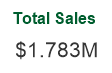
If I use “$(vScaleNumber(Sum(Sales)))” in a Straight Table expression without label, hovering over the column heading will show me the full substitution in  a tooltip.
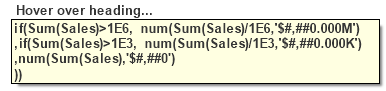
I  can see that the “$1” substitution occurs before the expression is evaluated, and the substituted expression looks like:

if(Sum(Sales)>1E6, num(Sum(Sales)/1E6,'$#,##0.000M')
 ,if(Sum(Sales)>1E3, num(Sum(Sales)/1E3,'$#,##0.000K')
 ,num(Sum(Sales),'$#,##0')
 ))

I’ve avoided re-typing “Sum(Sales)”. But I may have a concern about the performance implications of repeated execution of “Sum(Sales)”.  And what about more complex expressions such as “Round(Sum(Sales),10)”?  The comma in that expression will break the syntax as variable parameters always treat commas as parameter separators.
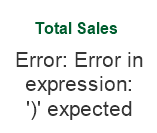
I can fix the comma/performance problem by using Dollar Sign Expansion (DSE) with an “=”.  The “=” will cause the expression to evaluate and pass the numerical result to vScaleNumber.

=$(vScaleNumber($(=round(Sum(Sales),10))))

Checking the expansion in a Straight Table shows:

if(1783150>1E6, num(1783150/1E6,'$#,##0.000M')
,if(1783150>1E3, num(1783150/1E3,'$#,##0.000K')
,num(1783150,'$#,##0')
))

I  see the value of “round(Sum(Sales),10)” has been calculated as “1783150”,  yielding an efficient and syntactically correct expression.

Next  I’ll add a Dimension to the Straight Table.  The row results are incorrect!
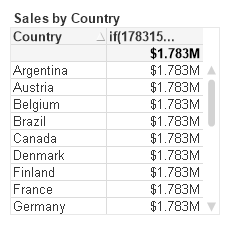
The “=” in the DSE caused the Sum expression  to be evaluated only once for the entire chart, yielding the same value for every row.  How to fix?

I will calculate the sum() expression in a n Expression n column, and then hide this column on the Presentation tab. I can then refer to the hidden column:

=$(vScaleNumber(Column(1)))

Once again, the expansion yields an efficient and syntactically correct expression.

if(Column(1)>1E6, num(Column(1)/1E6,'$#,##0.000M')
 ,if(Column(1)>1E3, num(Column(1)/1E3,'$#,##0.000K')
 ,num(Column(1),'$#,##0')
 ))

I started this post by demonstrating a simple expression to format scaled numbers. It’s a function I frequently use.

For more on DSE, see Henric’s post at https://community.qlik.com/blogs/qlikviewdesignblog/2013/11/18/dollar-expansions

A QVW example to accompany this post is available for download at https://qlikviewcookbook.com/wp-content/uploads/2016/05/ScalingNumbers.qvw.

-Rob

Share

The Cost of Preceding Load

Important Note: The performance penalty discussed below was fixed in the Nov2017 release. There is no longer a penalty when using Preceding Load.

Summary: While preceding load is a powerful tool,  the current performance penalty may cause you to reconsider using it for anything but the smallest of data sets.

I’m a big fan of the “Preceding Load” feature in Qlik Script. This is the facility that allows us to stack a LOAD statement on top of a SQL statement, or stack two or more loads to simplify coding.

I’ve written about the beauty of  preceding load in 2009 and 2014   HIC praised the feature in the Qlik Design Blog in 2013.

I’ve generally thought there is no downside to using  Preceding Load. I believed preceding load would always be faster than multiple load resident — even when presented with examples to the contrary (credit  to Sandro Krumbein, Bill Markham, others).

When I first tested the performance of preceding load in QV8 and QV9, I detected very little overhead.  With  QV11 and QV12, the penalty (for LOAD on LOAD) is extremely large, such that I currently avoid using preceding except in small data sets.

Let look at a simple test case, that of creating an additional field when loading a QVD.  Admittedly thiis is not a good candidate for preceding load, but it should be a viable test case.

Creating the field without preceding:

LOAD *, A&B as B2 FROM data.qvd (qvd)

Creating with preceding:

LOAD *, A&B as B2; LOAD * FROM data.qvd (qvd)

Both statements will result in a non-optimized load.  Here is time in seconds to perform each statement in QV version 9,  along with an optimized load for  comparison.

The preceding load takes 28% longer, a significant amount. However, back then I was more worried about the loss of the optimized load. That was a difference worth caring about!

Now lets add in the test results for versions 11 & 12.

Overall, a big improvement in total time vs V9, especially in the non-optimized load. But a significantly larger penalty when using preceding. Why?

Before I go on, I realize you may be wondering about the performance of a LOAD on SQL like:

LOAD *;
 SQL SELECT * FROM ...;

My testing show this incurs approximately a 4% penalty, so not to worry for LOAD/SQL.

Back to LOAD on LOAD from QVD or Resident.  Wouldn’t it be great if we could spend only 4% more for the preceding, instead of the %230 in V12 above?

Where is the extra time going? I’ll simplify the test to create no extra fields. Just a

LOAD *;
LOAD * FROM data.qvd(qvd);

For comparison, I try 1, 2 and 3 “LOAD *;” statements stacked on LOADs from QVD and Resident.

I see a large increase in the first preceding, followed by smaller increases for each subsequent LOAD.  The numbers suggest, contrary to popular teaching, that a series of resident loads may be faster than preceding load.

Where is that time going? Let’s look at IO and CPU counters for each each test.

The additional time all seems to be CPU related.  Interesting to me, the “Read Operations” count for the QVD Preceding seem to indicate that QVD is actually read using the optimized block IO technique.

What’s happening with that extra CPU time? Is it required or is it something that can be improved? I’ll try to ask R&D folks this question at the upcoming  Qonnections May 2.

In the meantime, let me know if you’ve seem similar or different results in your load scripts when using preceding load.

-Rob


Share

SF Bay Qlik Dev Group — March 16

Have you been to a Qlik Dev Group meetup yet?  Why not?  The meetings are free and take place all over the world.  At QDG high quality Qlik speakers like Henric Cronstrom, Donald Farmer and Alexander Karlsson offer insight and details of Qlik products.  Community presenters like Richard Pearce and Brian Booden offer development tips and show off wow extensions.

It’s a place to share technology, practices and tips in a non-competitive, no-selling environment.

I’m pleased to be hosting and presenting at the inaugural SF Bay Area Qlik Dev Group meetup on March 16 from 5:30pm to 8:30pm.  The location for this meeting is conveniently located next to the Montgomery BART station.  Please pre-register if you plan to attend.

In addition to introducing the QGD idea, I’ll be presenting “10 Qlik Performance Tips”.  Our agenda is in progress and we will announce additional presenters on the SF Region page as they are confirmed.

I hope to see you in SF! If that is not in your neighborhood, I hope you will join a meeting in your region of the world.  Learn more about the Qlik Dev Group on the QDG Homepage. 

QDG_Logo_72dpi_150w


Eat. Sleep. Qlik. Repeat


Share

Milan Early Discount Ends 19 February

Milan Banner


The next edition of the “Masters Summit for Qlik” takes place in Milan 5-7 April.  A discount of $300 is available for registration before 19 Feb.

Want to take your Qlik skills to the next level? At the Summit, Qlik Developers (you) will be immersed in three days of hands-on advanced and intermediate training covering topics such as advanced scripting, advanced expressions & aggregation, visualization, data modeling and  performance.

Join us as we enter our fourth year and our ninth event. What have you missed?

Training is led by four popular instructors, all well known as Consultants, Book Authors, Bloggers, Qlik Luminaries and longtime QlikCommunity contributors.

Barry Harmsen: Co-author of the seminal book “QlikView 11 for Developers” and founder of the Q-on Training Center.

Oleg Troyansky:  Author of  “QlikView Your Business” , QlikView veteran and one of the all time top contributors to QlikCommunity.

Rob Wunderlich (hey that’s me!):  Publisher of QlikViewCookbook.com and founder of the QlikView Components open source script library.

Bill Lay: Visualization wizard and everyone’s favorite presenter. Bill’s entertaining  presentation style makes any topic interesting and engaging.

In addition to the class material, we’ll have evening panel discussions, a guest speaker from Qlik Italy and plenty of opportunities to network with peers.

Read more about the Masters Summit for Qlik and Register here by 19 Feb to get that $300 discount! See you in Milan!

Share