Category Archives: Scripting

Becoming a Scripting Ninja

As a QV Consultant, I split my time between delivering training and QV Practice.  I like both sides of the business, but I particularly enjoy contributing to the excitement of using QV that results from training.

During a lunch break today, I mentioned the Masters Summit for Qlikview to one of my students. He asked “What does it take to become a Master?”. Of course I answered “Attend the summit! “.  But it reminded me of a list I present when delivering  Qlikview Developer (Scripting & Data Modeling) training.

Most of us experienced instructors augment the standard curriculum with our own real-world experiences. When teaching scripting, in addition to surveying the range of scripting statements and modeling solutions, I emphasize three specific scripting features as “Ninja skills” — script features whose mastery makes you deadly effective. My “Scripting Ninja” list is:

1. MAPPING LOAD. Understanding how to create a Mapping table. How to use that table in all it’s forms — ApplyMap(), MAP USING, RENAME USING and the other metadata USINGs — TAG and COMMENT.

2. IntervalMatch — has many uses  including Slowly Changing dimensions, Currency Rates, Dimension Bucketing to name a few.

3. Preceding Load — can be used to create powerful parsing scripts and simplify the maintenance and accuracy of script. Here’s a primer on Preceding Load.

Those are the three special QV scripting features that stand out for me as exceptionally powerful and well worth mastering. Are there others you would add to the Ninja list?

-Rob


Share

Speed up Script Development with BUFFER

A BUFFER prefix on a LOAD or SQL statement creates and maintains an automatic QVD for that statement. Subsequent executions of the LOAD/SELECT statement will read from the QVD, avoiding another (slower) trip to the database. A read from QVD is generally 5-10 times faster than fetching from database.

TranTab:
BUFFER LOAD 
TranID,
Amount,
CustomerID,
etc…
;
SQL SELECT * FROM TRANSACTIONS
;

On first execution, the SELECT will fetch rows from the database and the resulting TranTab will be stored in a specially named QVD on the local machine. On subsequent reloads, TranTab will automatically be loaded from the local QVD.

If you make a change to the TranTab LOAD/SQL statement, QV Reload will detect the change and fetch from the database again and update the local QVD.

During script development it’s not uncommon to perform a reload several times. You can greatly reduce the duration of a script run by adding BUFFER to your statements. Any script changes/adds you make will automatically invalidate that buffer and re-fetch from the database.

Don’t forget to remove the BUFFER keyword before moving to production!

You can read more about BUFFER and some optional parameters in the Qlikview Help.

-Rob

Share

DROP FIELD Does Not Release All Space

During the “Performance Tuning” session at the Barcelona Masters Summit, Oleg Troyansky demonstrated using Document Analyzer to identify unused fields followed by DROP FIELD statements to remove those unused fields from the data model. Roland Vecera offered an interesting discovery.  DROP FIELD after a BINARY LOAD does not free the expected amount of memory.

For Example:
Binary dropfieldstest_dm.qvw;
DROP FIELD A,B;

Roland has found that a subsequent LOAD RESIDENT of each affected table is required to fully reduce disk and RAM consumption to the expected level.

A field in a QVW is represented by three storage structures:
1. Symbol table, which stores the unique values of the field.
2. Record pointers, a pointer on each table row to the symbol value.
3. State space, where field selections are tracked.

Based on testing and calculation, my interpretation is that in this scenario (BINARY LOAD/DROP FIELD), the Symbols and State space is released. However, the space occupied by the Record pointers is not released, i.e. the records are not rewritten. This may be a significant amount of space, particularly when a table contains many rows.

For most developers this will be an obscure issue. But for people tuning large applications, this may provide an “aha”moment.

Thanks Roland!

Share

“Fastest” Method to Read max(field) From a QVD

Gather any group of enthusiasts together over a pint after work and inevitably there will be debate over what I call a “Pub Question”. Comic Fans will argue who would win in a fight between Batman and Spiderman, Web Programmers will debate the merits of Java vs .Net. For a group of Qlikview Script developers, the question may be “what’s the fastest script to get max value of a field from a QVD?”.

Qlikview has virtual Pubs in the Community Forums and blogs where these questions get raised. In a recent blog post http://qlikviewnotes.blogspot.com/2013/08/super-fast-method-to-retrieve-qvd-high.html I got some comments about this very question, including a couple of methods I had not tried before.

Let’s dispense with the Resident Table first. The fastest method for a Resident Table is loading the FieldValue()s.

LOAD Max(Id) as MaxId;
LOAD FieldValue(‘Id’, recno()) as Id
AUTOGENERATE FieldValueCount(‘Id’); 

This is much faster than loading From Resident like this:

LOADmax(Id) Resident data; 

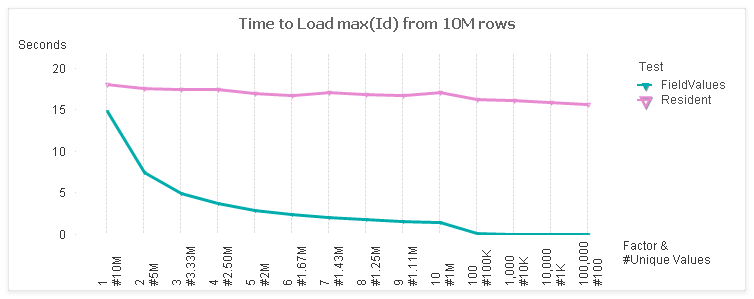
Here’s a comparison of the two:

For the test, I use a table with 10M rows and 7 fields. I vary the cardinality of the “Id” field from 1:1 to 100K:1. The x-axis of the chart shows the factor and the number of unique values (rows / factor).

The left side of the chart represents the maximum unique values at 1:1. The rightmost side of  the chart is least unique with only 100 values.  These ranges represent some real world cases such as:
1:1 — Primary Keys
2:1 — Timestamp values
1000 values — Date values

For a 1:1 case, there is not much difference between the FieldValues and Resident methods. However, as the number of values decrease, the FieldValue method follows in a linear trend. The Resident stays fairly constant as the same number of rows are being read.

Now on to the answering the “Fastest” when loading from a QVD. The answer, like all good Pub Questions, is “it depends”.  I ran timing tests on the following methods:

QVD :

LOADmax(Id) FROM (qvd); 

QVD-*/FieldValues:
LOAD * FROM (qvd);
LOAD max(FieldValue(‘Id’, recno())) 
AUTOGENERATE FieldValueCount(‘Id’);
QVD-DISTINCT-Field/FieldValues:
LOAD DISTINCT Id FROM (qvd);
LOAD max(FieldValue(‘Id’, recno())) 
AUTOGENERATE FieldValueCount(‘Id’);
QVD-DISTINCT-Field/Resident:
LOAD DISTINCT Id FROM (qvd);
LOADmax(Id) Resident table;
QVD-Field/FieldValues:
LOAD Id FROM (qvd);
LOAD max(FieldValue(‘Id’, recno())) 
AUTOGENERATE FieldValueCount(‘Id’);
QVD-Field/Resident:
LOAD Id FROM (qvd);
LOAD max(IdResident table;

Everything but the first case will be an Optimized QVD Load.

Here are the test results.

Surprisingly, the QVD only case is the winner for Factors 1-3, even though it is an un-optimized Load. This is not so surprising when you consider how data is stored in a QVD. The field values are stored in a symbol array, just like a qvw in RAM. Reading a single field would require only reading in those symbols. Combining the max() logic with this step would be efficient.

Note that the LOAD RESIDENT operation doesn’t benefit much from a deceasing number of values. At the 1:1 end, all techniques are processing the same quantity of 10M values. As we move to the right, LOAD RESIDENT continues to process 10M values (rows) while the other techniques benefit from lessor quantities.

Let’s drill in a bit. I’ll exclude the QVD-Field/Resident test (for scale) and narrow the Factors to the middle stuff, 4 – 1000.

And here’s the total time for those selections.

So…if I had to pick the “fastest”:
– For 1:1 cardinality, like Primary Keys or revision numbers, direct from the QVD is fastest.
– For most other general cases, Loading just the field and then processing Fieldvalues is fastest.

Of course, there are a number of factors beside the data profile that can impact the results. Disk speed, number of cores, etc. I’d love to hear if you have different experiences.

My colleagues at the upcoming October 9 Masters Summit for Qlikview in London and Barcelona may have some thoughts of their own on this question. In addition to core topics, Oleg is presenting “Performance Tuning” and Bill is presenting “Tips & Tricks”. Both sessions should provide some practical pointers for speeding up your apps. There is still time to register for the Summit. If you attend, perhaps we can continue this discussion at an evening “Pub Session”.

-Rob

Share

Autonumber() Key Fields and Sequential Integer Optimization

Today let’s reinforce some QV data model principles for us old timers and introduce a few tricks for newbies to Qlikview.

#1. Keys are not data. Key Fields in a Qlikview model should serve the data modeler, and not be used by chart Designers as data.

Consider two tables, OrderHeader (one row for each Order) and OrderDetails (one row for each Order Line). linked together by Field OrderID.


OrderID may be a value that you need to display in your charts. However, problems arise when you try to do things like count(OrderID). Which end of the connection should the expression count? It’s unreliable as discussed in detail here:
http://qlikviewnotes.blogspot.com/2010/01/best-way-to-count-keys-dont.html

The solution is to create a counter field on the table that represents the correct cardinality for the counter. If we are counting Orders, that would be the OrderHeader table.

In the LOAD of the OrderHeader table:

1 as OrderCounter

Part two of of the recommendation is to isolate the key field so it is not mistakenly used as a data field. We do this by prefixing the key field name with a special character and SETing the QV system variable “HidePrefix” to that character.

SET HidePrefix=’%’;

In the LOAD of both OrderHeader and OrderDetails:
OrderID as %OrderID

Fields that begin with the HidePrefix value will not show up in:
–  Current Selections.
– Dimension or Expression property dialog (unless “Show System Fields” is checked).

Of course, the specific values of OrderID may be useful to display in UI charts. In that case we must preserve it as a data item in one and only one table. We will include it in the LOAD of the OrderHeader table. Our data model now looks like this:


OrderID is available as a data field, but appropriately only from the OrderHeader table.

OrderCounter is now available as a field such that
=sum(OrderCounter)
will yield the correct Order count.

Now we (the Data Modelers!) own those “%” key fields! They are ours, we told the UI designers explicitly that “it is not data” .

Part three, and a very important part indeed, is to autonumber() the key fields. Autonumber() is a Qlikview lookup function that translates parameter values into integers. The sequential integers returned by autonumber() will reduce the RAM requirements and increase the linkage efficiency as detailed here
http://qlikviewnotes.blogspot.com/2008/05/memory-sizes-for-data-types.html
and
http://community.qlikview.com/blogs/qlikviewdesignblog/2012/11/20/symbol-tables-and-bit-stuffed-pointers

Admittedly, it gets a bit geeky. Bottom line, here is what you want to do for your keys:
autonumber(OrderID, ‘%OrderID’) as %OrderID

The autonumber() function converts values to sequential integers. The second parameter,  ‘%OrderID’, is important if you have multiple keys being autonumber() in your script.

To summarize:
#1. Keys are not data.
#2, Isolate keys using the “SET HidePrefix=x;” variable. Establish counter fields on the appropriate table.
#3. Use the Autonumber() function to convert key field values to sequential integers. This will minimize the memory footprint of the application and improve the efficiency of cross table look-ups.

My friend and colleague Barry Harmsen, author of QlikView 11 for Developers, who is a much wiser data modeler than I, will be discussing QV data modeling in depth with me at the Masters Summit for Qlikview in Europe this October. I hope you can join us!

Share

Super Fast Method to Retrieve QVD High Value

Delta Load, sometimes called Incremental Load, is the technique of pulling only changed or new rows from a database and then merging those rows with a master QVD. The Delta Load pattern follows these general steps:

1. Determine high water mark (“last reload”)
2. Build WHERE predicate in syntax of target DB.
3. SQL SELECT delta rows.
4. Merge delta rows with QVD.
5. If Deletes, INNER JOIN entire set of Keys from DB with QVD

The first step is to determine what cutoff value — delta point — do we want to pass in the SQL SELECT WHERE clause to identify new rows. This value is usually the highest value in the existing QVD.

The most robust and reliable method for step one is loading with max() from the existing QVD. For example:
LOADmax(LastModified) asMaxModifiedFROMmyqvd.qvd (qvd); 

This works well, but reading the entire QVD can take a very looooong time for a large QVD.

A much faster method is to aggregate the max value for the Delta rows only and then save that value on the first row of the QVD. In subsequent delta loads, only the first row of the QVD is read to get the value. This is extremely fast and is not effected by QVD size. For example:

Facts:
SQLSELECT * 
FROMmytableWHERELastModified>= ‘$(vMaxModified)’;

JOIN(Facts)
LOADmax(LastModified) asHighWaterValue
RESIDENTFacts;
// Do QVD Merge…and STORE Facts INTO Facts.qvd
Retrieve value later with:
 FIRST 1 LOADHighWaterValueFROMFacts.qvd(qvd

The “HighWaterValue” field will contain a relatively small number of values and will therefore have a negligible impact on the size of the QVD. You will of course have to create the field the first time before trying to load it with the “FIRST 1…”.

If you are using Qlikview Components (QVC) V8+ for delta loading, you can enable this high performance strategy by setting the variable:

SETQvc.Loader.v.StoreMaxModFieldValue = -1; 

QVC will automatically create a high water field named Qvc.MaxModFieldValue
and detect the availability of the field on subsequent loads. There is no need to pre-create the field before turning on this feature.

The technique is part of the Advanced Scripting material I’ll be presenting at the upcoming Masters Summit for Qlikview in Europe this October. I’ll be discussing more about Delta Loads, including strategies for merging large QVDs and tables with non-unique keys. Review the full agenda here and decide if the Masters Summit might help take your Qlikview skills to the next level.

Share

Assigning Dual() Values With a Dummy Load

A clever customer reminded me of a useful script technique this week. Here’s the scenario.

A dashboard script was loading all fields from a qvd as:
LOAD * FROM data.qvd (qvd);

One of the fields, “Shipped”, was a flag field that contains the values 0/1. It became apparent in the dashboard UI that this would look better as a Dual() field with display values of Yes/No. It was agreed that the QVD should be modified to create a Dual(), but it will be some time before that change can be made. In the meantime, the change should be made in this dashboard script.

The Shipped field could be made a Dual() by modifying the QVD load statement in one of two ways.

1. Instead of “LOAD *”, list each field and apply the Dual() function to the Shipped field.
2. Add an additional field “Shipped2” and rename/drop to replace the Shipped field.

Both of these techniques share the downside of making the QVD load un-optimized, losing the speed advantage of optimized load.

Another possibility would be to create a Map with Dual() types and MAP the Shipped field:
MAP Shipped USING MyMap;
However, global mapping does not occur for optimized loads. To make the mapping work, you would have to force an un-optimized load.

Is there a way to change Shipped to Dual() while retaining the optimized load? Yes — here’s one way;

temp:
LOAD Dual(str,num) as Shipped INLINE [
str, num
Yes, 1
No, 0
];

data:
LOAD * FROM data.qvd (qvd)
;

DROP TABLE temp;

Before loading the QVD  we load a temp table with the field “Shipped” using the correct dual() values. The temp table is later dropped after the QVD is loaded. The key to making this effective is that you must uncheck “Survive Reload” for the Shipped field in Document Properties -> Number.

It’s an interesting technique and the extra blocks of code can be removed when the Dual() is eventually added to the QVD.

-Rob

Share

Filling Default Values Using Mapping

It’s common to have a Qlikview table that contains null values for some fields. The nulls may be a result of source data nulls, QV Joins or Concatenates. Regardless of how the nulls were created, in this post I’ll demonstrate an easy to maintain global technique for replacing all nulls in a table with default values.

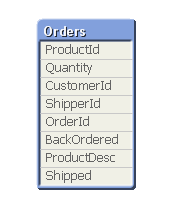
Consider this sample table:


The table has been created through a mix of Join and Concatenate. It’s data looks like this:


Note the null ProductDesc  because there is no match on ProductId. The BackOrdered field is null for orders that didn’t come in from the BackOrder table. Shipped is null for orders that had no match in a Join with the Shipments table.

What if we want to have meaningful values for the nulls, perhaps to make them selectable? We may have been able to assign defaults as we built the table, but that can be a hassle. Let’s do it the easy way after the table is built.

First we build Mapping tables for the output values we want to assign. For BackOrdered and Shipped, null should be ‘N’. For null ProductDesc, we want to assign the string ‘MISSING!’.

Recall that a Mapping table has two columns — column1 the value to be mapped (null in this case), column2 the value to be assigned. A value that does not appear in the Mapping table remains unchanged. Let’s create two Mapping tables for the two output values.

YNMap:
MAPPING LOAD 
null(), ‘N’ AutoGenerate 1;


MissingMap:
MAPPING LOAD 
null(), ‘MISSING!’ AutoGenerate 1;

Next we connect fields to the mapping tables with MAP USING statements. The statement identifies the field and Mapping table that should be used.

MAP Shipped USING YNMap;
MAP BackOrdered USING YNMap;
MAP ProductDesc USING MissingMap;

The mapping will be applied when the field value is created. So how do we apply the map to an already existing table? We make a copy of the table. That will cause the latest mapping to be applied

Orders2:
NoConcatenate   // This is important! We want a new table!
LOAD * RESIDENT Orders;
DROP TABLE Orders;  // Drop the original table

And now the  data looks like this (bold added).


This is a simple method to make your data as robust as possible for the user experience in the front end.

-Rob

Share

My Script Wishlist for QV.next

Here are a few items I hope show up as script and development features in Qlikview.next.

1. Script scoped variables. I use a lot of variables in script and it’s a hassle to have to delete them at the end of the script before they get promoted to the UI. I’d like to have a variable type that gets automatically dropped at script end. Perhaps by naming pattern like:
  SET ScriptOnlyVariablePrefix=’_’;

2. Function blocks in script. Not variables with parameters, but blocks that can execute multiple script statements and return a single result.

3. Allow the CALL statement (and other control statements) to span multiple lines. 

4. Regular Expression test and match functions. 

– A few more that are not script, but development related:

5. A chart function to read Field and Table Comments. 

6. Menu command to open the script logfile. 

7. Support cases remain open until a bug fix is delivered — not closed when a bug id is assigned. 

-Rob


Share

Establishing a Sort Order

Sometimes a desired sort order does not follow a natural alpha or numeric sort pattern. For example, there may be project phase names that should appear in charts in this specific order:

Design
Review
Budget
Implementation

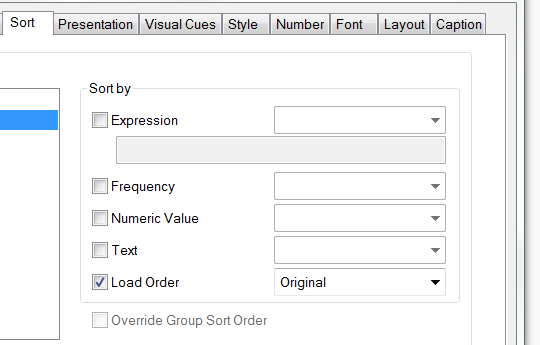
One of the Sortby  options available in chart properties is “Load Order”.

A specific Load Order for a field can be created by loading a dummy table with the desired order prior to loading the source data. The dummy table “PhaseSort” may be dropped after loading the source data.

// Load a dummy table to establish 
// sort order for field “Phase”.
PhaseSort:
LOAD * INLINE [
Phase
Design
Review
Budget
Implementation
]
;

// Load the source data
Fact:
LOAD 
ProjectId, Phase, Amount
FROM projects.qvd (qvd)
;

// Dummy table no longer needed
DROP TABLE PhaseSort;

-Rob

Share