Gather any group of enthusiasts together over a pint after work and inevitably there will be debate over what I call a “Pub Question”. Comic Fans will argue who would win in a fight between Batman and Spiderman, Web Programmers will debate the merits of Java vs .Net. For a group of Qlikview Script developers, the question may be “what’s the fastest script to get max value of a field from a QVD?”.
Qlikview has virtual Pubs in the Community Forums and blogs where these questions get raised. In a recent blog post http://qlikviewnotes.blogspot.com/2013/08/super-fast-method-to-retrieve-qvd-high.html I got some comments about this very question, including a couple of methods I had not tried before.
Let’s dispense with the Resident Table first. The fastest method for a Resident Table is loading the FieldValue()s.
LOAD Max(Id) as MaxId;
LOAD FieldValue(‘Id’, recno()) as Id
AUTOGENERATE FieldValueCount(‘Id’);
This is much faster than loading From Resident like this:
LOADmax(Id) Resident data;
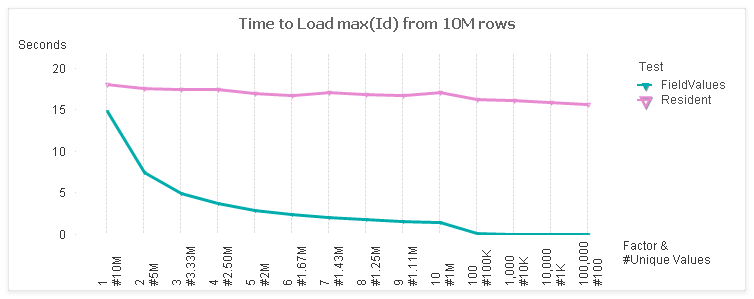
Here’s a comparison of the two:
For the test, I use a table with 10M rows and 7 fields. I vary the cardinality of the “Id” field from 1:1 to 100K:1. The x-axis of the chart shows the factor and the number of unique values (rows / factor).
The left side of the chart represents the maximum unique values at 1:1. The rightmost side of the chart is least unique with only 100 values. These ranges represent some real world cases such as:
1:1 — Primary Keys
2:1 — Timestamp values
1000 values — Date values
For a 1:1 case, there is not much difference between the FieldValues and Resident methods. However, as the number of values decrease, the FieldValue method follows in a linear trend. The Resident stays fairly constant as the same number of rows are being read.
Now on to the answering the “Fastest” when loading from a QVD. The answer, like all good Pub Questions, is “it depends”. I ran timing tests on the following methods:
QVD :
LOADmax(Id) FROM (qvd);
QVD-*/FieldValues:
LOAD * FROM (qvd);
LOAD max(FieldValue(‘Id’, recno()))
AUTOGENERATE FieldValueCount(‘Id’);
QVD-DISTINCT-Field/FieldValues:
LOAD DISTINCT Id FROM (qvd);
LOAD max(FieldValue(‘Id’, recno()))
AUTOGENERATE FieldValueCount(‘Id’);
QVD-DISTINCT-Field/Resident:
LOAD DISTINCT Id FROM (qvd);
LOADmax(Id) Resident table;
QVD-Field/FieldValues:
LOAD Id FROM (qvd);
LOAD max(FieldValue(‘Id’, recno()))
AUTOGENERATE FieldValueCount(‘Id’);
QVD-Field/Resident:
LOAD Id FROM (qvd);
LOAD max(Id) Resident table;
Everything but the first case will be an Optimized QVD Load.
Here are the test results.
Surprisingly, the QVD only case is the winner for Factors 1-3, even though it is an un-optimized Load. This is not so surprising when you consider how data is stored in a QVD. The field values are stored in a symbol array, just like a qvw in RAM. Reading a single field would require only reading in those symbols. Combining the max() logic with this step would be efficient.
Note that the LOAD RESIDENT operation doesn’t benefit much from a deceasing number of values. At the 1:1 end, all techniques are processing the same quantity of 10M values. As we move to the right, LOAD RESIDENT continues to process 10M values (rows) while the other techniques benefit from lessor quantities.
Let’s drill in a bit. I’ll exclude the QVD-Field/Resident test (for scale) and narrow the Factors to the middle stuff, 4 – 1000.
And here’s the total time for those selections.
So…if I had to pick the “fastest”:
– For 1:1 cardinality, like Primary Keys or revision numbers, direct from the QVD is fastest.
– For most other general cases, Loading just the field and then processing Fieldvalues is fastest.
Of course, there are a number of factors beside the data profile that can impact the results. Disk speed, number of cores, etc. I’d love to hear if you have different experiences.
My colleagues at the upcoming October 9 Masters Summit for Qlikview in London and Barcelona may have some thoughts of their own on this question. In addition to core topics, Oleg is presenting “Performance Tuning” and Bill is presenting “Tips & Tricks”. Both sessions should provide some practical pointers for speeding up your apps. There is still time to register for the Summit. If you attend, perhaps we can continue this discussion at an evening “Pub Session”.
-Rob